


Flex Utility Premium
4.7583.00 Reviews
App Specs
- Version
- 237
- Updated On
- License
- $21.99
- Downloads
- 10,000+
- Developer
- JW Dev;
- Categories
- Tools
- Platform
- Android
Screenshots
 Analysis by AppCompare
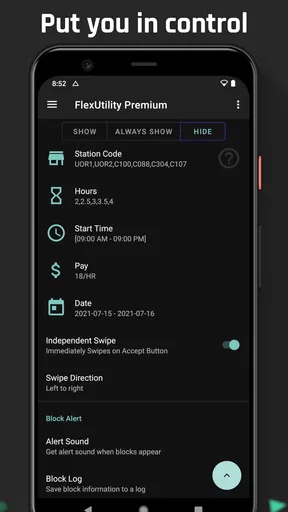
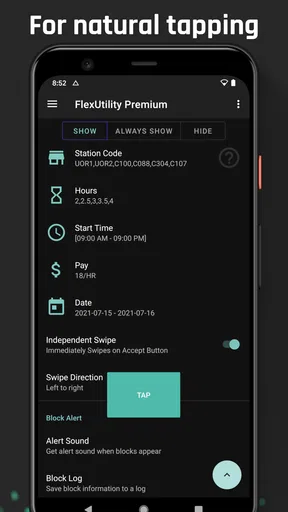
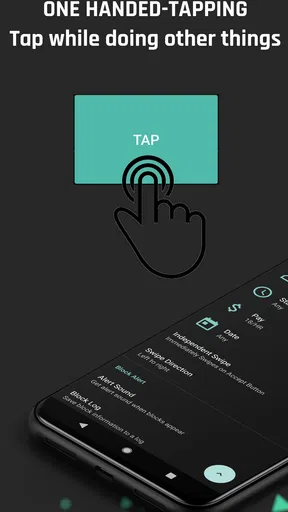
I’d approach Flex Utility Premium as a specialized tool for people who already know what they want it to do, rather than as a general-purpose phone cleaner. Its store summary points to convenient tapping and block filters, which gives it a much narrower identity than an all-in-one utility suite. That distinction matters: before paying, I’d want to understand whether those particular functions fit my routine and what choices the app asks me to make along the way.
Trust starts with knowing what you are installing
This is a paid Android tools app from JW Dev, with an Everyone age rating. It has a 4.6 average from around 3,100 ratings, and more than 10,000 installs. Those figures offer some context about its audience, but they are not a substitute for checking the app’s behavior on your own device. I would treat the rating as one signal, not as proof that every setting or workflow will suit me.
The name may sound like a broad phone utility, but I would not assume it includes the file organizer, task manager, performance booster, QR scanner, or unit converter described in older copy. The current identity is centered on Flex-related tapping and block filters. That focus can be a plus if you need those tools, but it also makes it important to judge the app against that specific job rather than against a bundle of unrelated utilities.
What I would check before relying on it
Because tapping tools and filters can affect how a workflow behaves, I would begin by exploring the available settings before using them in a situation where a missed action would matter. I’d look for clear labels, a way to preview or adjust a rule, and an obvious route to pause or undo a change. Those are practical checks, not claims about controls I have not verified.
I also would not grant any device access casually. When Android presents a permission prompt, I’d read its purpose and decide whether it makes sense for the feature I’m trying to use. If the explanation is unclear, I’d stop and investigate rather than approving it simply to get past setup. The same cautious approach applies to any account connection or external service the app might offer: I would use only what I understand and need.
For a data-sensitive workflow, start with a low-stakes test. Try a filter with a harmless example, observe the result, then adjust one setting at a time. This makes it easier to tell which choice changed the outcome. I’d avoid testing several rules simultaneously, because that can make an unexpected result harder to trace back to its cause.
Price, version, and practical fit
The listed price is $21.99, and in-app purchases range from $5.99 to $49.99 per item. I’d check the purchase screen carefully so I know what the upfront payment covers and whether an optional item is relevant to my use. A premium label alone does not tell me which features are included, so I would compare the displayed options before confirming a transaction.
Worth Reading Before You Choose

Flipboard Shows What News Apps Must Do Beyond the Feed

Switching to Android Auto Means Rethinking Your Driving Routine

Google Calendar Makes a Crowded Week Easier to Manage

Ludo King Makes the Most of the Minutes Between Plans

Baby Panda World Brings Quick Play to Modern Phones, but Its Game Library Feels Busy

ESPN’s Live Game View Makes Following Close Games Easier
The current version is 232, and the app requires Android 7.0 or later. That gives prospective users a basic compatibility check, but I’d still confirm that my own device’s software meets the requirement before buying. If I rely on a particular tapping or filtering routine, I’d also test it after any app update rather than assuming the behavior will remain identical.
My cautious verdict is that this could be useful for someone who specifically needs its Flex-oriented tapping and block-filter workflow and is comfortable reviewing settings carefully. If I wanted a broad collection of everyday phone tools, I’d choose a general utility app instead. If I could not tell what a rule would change, or did not feel comfortable with the access it requested, I would skip it. The best reason to pay is a clear, recurring need—not the promise of a Swiss Army knife.
Ever found yourself in a bind, juggling multiple tasks on your phone and wishing for a magic wand to make it all easier? Well, let me introduce you to Flex Utility Premium. This app is like a Swiss Army knife for your smartphone, offering a bunch of nifty features that promise to simplify your digital life. I’ve had the chance to dive into this app, and let me tell you, it’s been quite the game-changer.
What’s the Fuss About?
The first thing that grabbed my attention when I fired up Flex Utility Premium was its clean and user-friendly interface. It’s designed in such a way that even if you’re not the most tech-savvy person on the block, you’ll navigate it with ease. The app is packed with essential tools that cater to a wide range of needs—think file management, task scheduling, and even a nifty little feature for boosting your device’s performance.
Features That Stand Out
One of the standout features is the file management system. It allows you to organize your documents, images, and videos with minimal fuss. I was particularly impressed by how it integrates with cloud services, making it seamless to access and manage files stored on platforms like Google Drive or Dropbox.
Another feature worth mentioning is the task manager. If you’re anything like me, juggling multiple tasks can sometimes feel overwhelming. The task manager helps you keep track of your to-dos, set reminders, and even prioritize tasks. It’s like having a personal assistant in your pocket.
And let’s not forget the device booster. This tool is perfect for those moments when your phone seems to be lagging. It optimizes your device’s performance by clearing cache and terminating unnecessary background apps. I noticed a significant improvement in my phone’s speed after using it.
The Little Extras
Aside from the main features, Flex Utility Premium also includes some cool extras like a QR code scanner and a unit converter. These might seem like small additions, but they come in handy more often than you’d think. I found myself using the QR code scanner at the grocery store to check product details, and the unit converter was a lifesaver while cooking and dealing with international recipes.
Is It Worth the Investment?
Now, let’s talk about the elephant in the room—pricing. The app isn’t free, but considering the range of features it offers, I’d say it’s a worthwhile investment. The premium version unlocks all the functionalities, and there are no annoying ads to disrupt your experience. Plus, the app is regularly updated, so you can expect new features and improvements over time.
For those who want to try before they buy, there’s a free trial available. It’s a great way to get a feel of what the app has to offer without committing right away. I gave the trial a go, and it was enough to convince me of its value.
The Final Verdict
In a world where our phones are practically an extension of ourselves, having an app like Flex Utility Premium makes life a tad easier. With its versatile features and user-friendly approach, it’s a tool I’d recommend to anyone looking to streamline their smartphone usage. Whether you’re a busy professional or someone just trying to keep things organized, this app has something for you.
So, if you’re ready to take your phone’s functionality to the next level, give Flex Utility Premium a shot. It might just be the digital assistant you never knew you needed.
A realistic way to judge its usefulness
I’d decide whether this app belongs on my phone by tying it to one repeated task, not by trying to make it the control center for everything. For example, if I regularly handle a Flex workflow that involves repeated taps and situations where block filters matter, I’d try one small, familiar task first. I’d note what I expect to happen, apply the relevant choice, and compare the result with my normal method. If it saves effort without making the outcome harder to understand, that is a meaningful benefit; if I spend more time checking the automation than doing the task, it is not.
A useful habit is to keep the first test narrow: change one setting, run the same kind of task, and then decide whether to keep that adjustment. This avoids confusing cause and effect and makes it easier to reverse course if the result is not what I intended. I would not start with an important or time-sensitive task, because a new utility should earn trust through predictable results before I depend on it.
Where it fits beside ordinary alternatives
Compared with doing every action manually, tapping utilities can reduce repetitive input, but they also introduce a layer of configuration that manual work does not have. Manual steps are slower when repeated, yet their result is usually easy to inspect as they happen. I’d choose Flex Utility for a routine that is frequent and consistent; I’d stick with manual interaction for a one-off task, an unusual case, or anything where I need to make a fresh judgment each time.
It also should not be confused with a general phone-maintenance app just because its name includes “Utility.” Someone looking for storage cleanup, file browsing, reminders, or a broad set of convenience tools should compare alternatives designed for those jobs. For a dedicated Flex-related workflow, a focused tool may be easier to evaluate than a bundle that offers many unrelated features. The trade-off is that a narrower app has to be judged on whether its particular controls are clear and dependable for your use.
Keeping control when routines change
Even a routine that works today can change when the task, screen, or your own preferences change. I’d revisit the settings whenever I alter the way I use the workflow, rather than letting old choices run indefinitely without checking them. If a result looks unexpected, I’d pause the process, return to the last setting I understood, and test again in a low-stakes situation. That is a more reliable approach than layering extra filters on top of a rule whose effect is already unclear.
For shared devices or phones used for work and personal tasks, I’d be especially deliberate about who can change the configuration and whether the same setup makes sense for every user. A convenience setting that helps one person may create confusion for another. Keeping the configuration simple and explaining any routine to someone who also uses the phone can prevent accidental changes from becoming a recurring nuisance.
Who should pass, and who may find a place for it
I would shortlist this app if I already have a repeated Flex-specific task, understand why tapping and block filters would help, and am willing to spend time checking the available choices. It is less compelling if I only want a general toolbox or expect an app to make decisions for me without supervision. People who prefer to keep device workflows entirely manual may also find the setup overhead unnecessary.
Before committing, I’d answer a few practical questions for myself: Can I explain what I want the app to change? Can I tell whether a setting worked as intended? Am I comfortable with any permission prompt that appears? Does the paid option match a need I have often enough to justify it? If I cannot answer those clearly, waiting is sensible. A utility should make a known task easier, not create pressure to authorize or buy something before I understand its role.
A measured recommendation
My recommendation is deliberately narrow: Flex Utility Premium makes the most sense when its tapping and filtering purpose matches a real, recurring need and its controls feel understandable during a careful trial on your own device. I would not buy it merely because it sounds like a complete smartphone toolkit, nor would I rely on an unfamiliar configuration for an important task on day one. Start small, keep your choices deliberate, and let the result—not the broad promise of convenience—decide whether it earns a place in your routine.
Pros
- User-friendly interface
- easy navigation.
- Fast and reliable performance overall.
- Comprehensive toolset for various tasks.
- Customizable settings for personalized use.
- Regular updates with new features.
Cons
- Premium version can be expensive.
- Occasional minor bugs reported.
- Requires stable internet connection.
- Limited support for older devices.
- In-app ads in free version are intrusive.
FAQs for Flex Utility Premium
What is Flex Utility Premium and what does it offer?
Flex Utility Premium is a versatile app designed to enhance your device's functionality with a suite of advanced tools and features. It offers premium options such as file management, device optimization, and customizable settings to improve user experience. Ideal for power users, it provides enhanced performance and personalization options.
Is Flex Utility Premium compatible with all Android and iOS devices?
Flex Utility Premium is compatible with a wide range of Android and iOS devices. However, for optimal performance, it is recommended to check the app's specific requirements on the download page. Some older devices may not support all features due to hardware limitations.
What are the key features of Flex Utility Premium?
Key features of Flex Utility Premium include advanced file management, device optimization, privacy tools, and extensive customization options. Users can enjoy seamless performance enhancements, secure data handling, and personalized settings that cater to individual needs, making it a comprehensive tool for device management.
Are there any subscription fees or in-app purchases in Flex Utility Premium?
Yes, Flex Utility Premium operates on a subscription model, offering various plans to suit different user needs. While the app can be downloaded for free, certain advanced features and tools require a premium subscription. Users can choose from monthly or annual plans based on their preferences.
How can I ensure the security of my data while using Flex Utility Premium?
Flex Utility Premium prioritizes user privacy and data security. The app employs robust encryption methods to protect user data and offers customizable privacy settings. Regular updates ensure that security measures are up-to-date, providing peace of mind while using the app's features.


